Capabilities
What it can do on day one.
chat
A web UI with streaming and tool use. Drop in an image and a model that can see will look at it. One that cannot will say so rather than guess.
handlers
"When a new file lands in the scans folder, rename it and log what it is." A short markdown file written with you in chat, run against incoming events with only the tools you granted it.
memory
What it learns about you, kept as markdown files with retrieval over them. Every change is a commit, and past conversations are searchable too.
files
A workspace of notes and todo lists. Point it at your Obsidian vault. Type
@turminder do X in any file and it becomes something it acts on.
projects
A fenced island of files, memories and past conversations. Load one when you start work on it. Until you do, nothing inside reaches a prompt, because the search itself is scoped, and notes written while it is loaded are filed inside it.
documents
Reads PDFs and Word files by outline first, then only the pages that matter. A .docx full of tracked changes reads as its final text. Any note or dashboard goes back out as a PDF.
schedule
Reminders and recurring work, arriving as desktop notifications, with approve and deny buttons on the ones that need you.
watch
"Track this package." A status checked on a timer by plain code, waking the model only when the answer changes. A delivered parcel closes its own watch.
embeds
Small sandboxed pages it writes for you: charts, dashboards wired to live data, slides, and mini-apps whose buttons it can act on.
integrations
Asana, Google Calendar, weather, web search and page fetching are built in. Credentials go in through a form, and only the tools you activate exist.
cost
Price your endpoints and every chat carries a running estimate. Ask what it has cost you this month. Every call records which model answered and why.
devices
Press connect on your phone and approve the prompt on a machine already linked. A desktop app and a browser extension come in the same door.
Skills and MCP servers
Ask for it, and it sets it up with you.
You never open a config file to connect something new. You ask, the assistant does the finding and the filling in, and then it stops at the one step that has to be yours.
Connecting something new
Say “connect my password manager”, or ask whether it can reach your home automation. The assistant works out which MCP server you need, tells you what it does, and puts a form in front of you with the exact command it wants to run and fields for your credentials.
Submitting that form is the approval, and it is the one step the assistant cannot take for you. Your key goes from that form into your keychain and stays there. It never passes through the chat, and the model only ever sees a reference to it.
config/mcp.yaml
Teaching it the house rules
A connection gives it tools. It still has to know when to reach for them and how you like the job done, and that is what a skill is: a short note in plain language about one kind of work.
The assistant offers to write one as soon as the connection works, and asks you the questions it needs answered. Months later you can open that file, change your mind, and it follows the new version.
skills/<name>.md
Permissions
Three levels, set per tool.
Every behavior you set up names the tools it may use, and you decide how far each one goes. Nothing it reads can raise its own permissions, whether that is a file, a web page, or a reply from a service you connected.
Off the table
absentIt doesn't have the tool and isn't offered one. There is nothing to reach for, and nothing it reads can put the tool back on the table.
Ask me first
confirmEverything stops and the question comes to you, wherever you are. Say no and it carries on with what it was allowed to do, and it can tell you what it wanted.
Go ahead
toolsYou decided once and it holds. It won't ask again for this, and every time it does the thing, that goes on the record too.
The trade
Slower to get to know you. Far harder to surprise you.
The usual shape is one always-on agent with broad standing permissions, where everything it reads lands in the same context that decides what to do. That gets you something useful in an afternoon. Turminder takes the other side of that bet, and both halves are worth stating plainly.
What you get
- Nothing acts until you have said it may, once, in a permission rather than a request the model is trusted to follow.
- An answer to "why did it do that". Every step is recorded: what set it off, what it decided, what it called, what came back.
- Your credentials never reach the model. They go from a form into your keychain, and what the model sees is a reference.
- Figures that came from the source. Dashboards pull live numbers through frozen read-only calls replayed by ordinary code, so they never pass through the model on the way to your screen.
- Your data is a folder. Markdown under git plus one database file. Copy it to a new machine and it is the same assistant, memories and all.
What it asks of you
- An evening to set up, and a few minutes each time you want it to do something new.
- You decide the behaviors. It writes them with you in chat, but the call is yours, and so is the file.
- No skill marketplace. Connecting an outside service is a form you submit with the command in front of you. It can suggest. It cannot install.
- Saying yes now and then, until a new routine has earned a standing permission.
- Patience early on. If what you want is maximum capability out of the box, the first week here will feel deliberate.
Run it
Node 22, an endpoint, and about five minutes.
Any OpenAI-compatible endpoint works: a model served on your own machine, or a hosted provider whose key you paste into setup. Handling tool calls well matters more than parameter count.
Just want the app? It brings its own runtime and looks after all of this for you. Download it →
- Set up Pick your provider and it fills in the rest. It probes what the endpoint can do before writing any config.
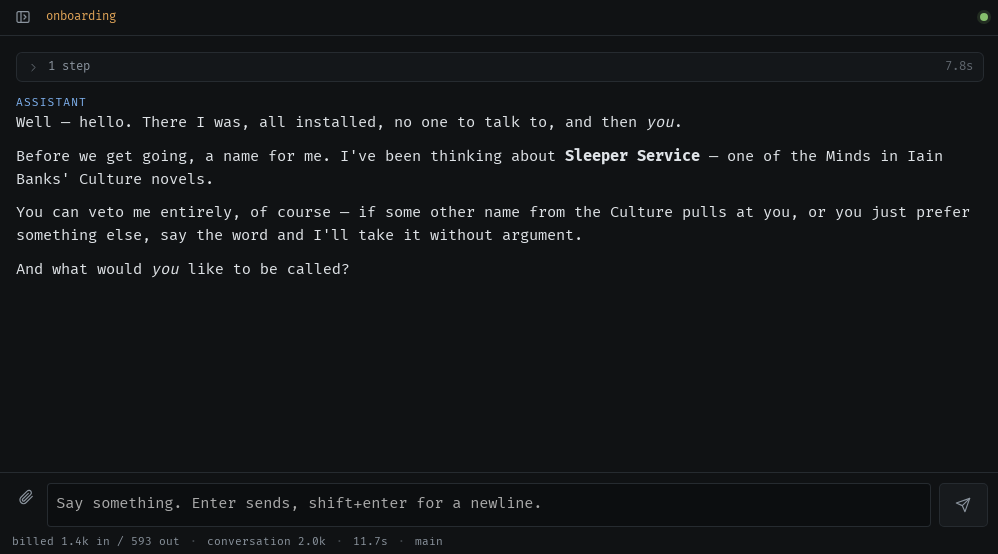
- Meet it The assistant opens the conversation itself, picks its own name, asks yours, and writes down who it is.
- Give it something to do "Set up google calendar." "When my notes mention a deadline, put it in my todo list." It asks for the permissions the new thing needs and remembers the arrangement.
$ git clone https://github.com/cvasseng/turminder
$ cd turminder && npm install
$ npm start
→ http://127.0.0.1:7787
Everything it knows lives in ~/.turminder, a git repo of markdown
plus one database file. Back it up by copying the folder. It listens on localhost
by default; for other machines on your network, put it behind Tailscale or
WireGuard.